
- 描述
- 其他信息
- 用户评价 (0)
描述
HUMZOR NexzCheck NC601 OBD2 Code Reader Diagnostic Scanner is is a new generation code reader designed for comprehensive diagnostic analysis of both diesel and gasoline vehicles. HUMZOR NC601 Car Engine Fault Code Reader For 12V & 24V Gasoline and Diesel Vehicles. CheShiTech.com HUMZOR NC601 OBD2 Car Scanner HUMZOR NexzCheck NC601 Car and Truck OBD2 Scan Tool Diagnostic Tool Support More than 50000 fault code analysis for car and heavy-duty.
HUMZOR NexzCheck NC601 OBD2 Code Reader Diagnostic Scanner HUMZOR NC601 Car Engine Fault Code Reader For 12V & 24V Gasoline and Diesel Vehicles
CheShiTech.com HUMZOR NC601 OBD2 Car Scanner HUMZOR NexzCheck NC601 Car and Truck OBD2 Scan Tool Diagnostic Tool Support More than 50000 fault code analysis for car and heavy-duty
HUMZOR NexzCheck NC601 OBD2 Code Reader Diagnostic Scanner Introduction:
New generation of HUMZOR NC601 code reader for diesel and gasoline cars. Support 12V and 24V gasoline and diesel OBD2 diagnosis prototcols. More than 50000 fault code analysis for car and heavy-duty. 12 functions supported: smog check fuel analysis battery analysis,live data freeze data mode 6 and mode 8 in the cars.
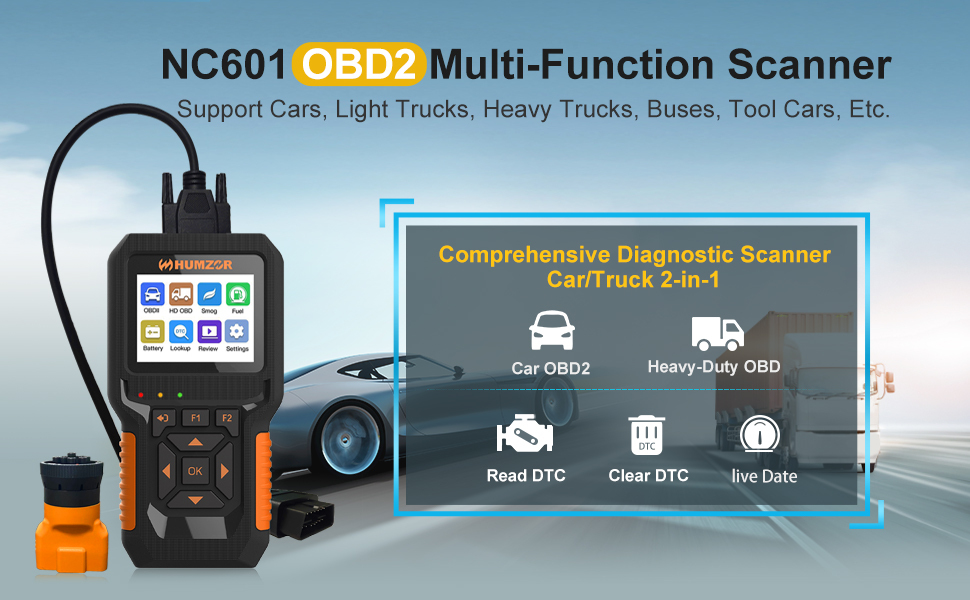
The HUMZOR NexzCheck NC601 is a new generation code reader designed for comprehensive diagnostic analysis of both diesel and gasoline vehicles. This device offers a user-friendly, plug-and-play experience with multi-functional capabilities for vehicle inspection and maintenance. It supports a wide range of vehicles and diagnostic protocols, making it an essential tool for automotive enthusiasts and professionals.
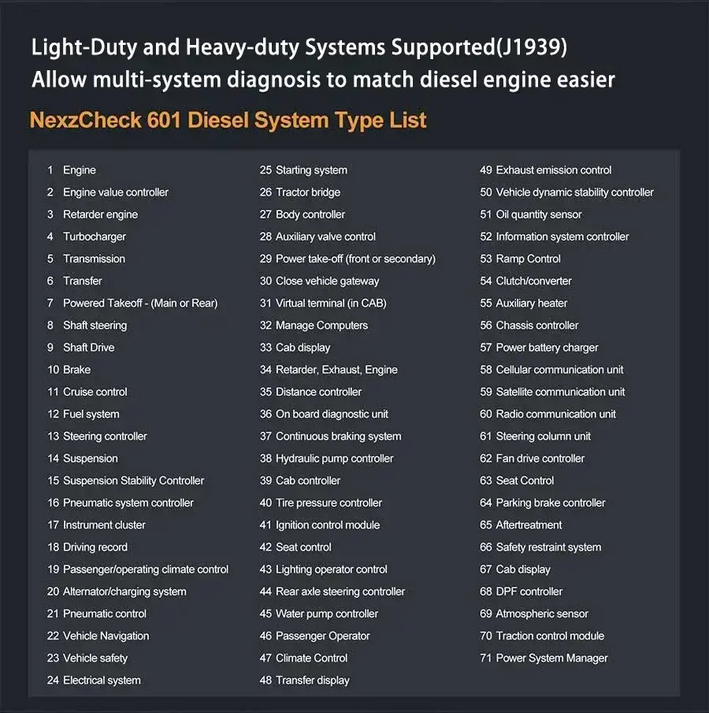
HUMZOR NC601 handheld scanner has a complete obd2 scanning diagnostic function, which can easily read car engine faults, and at the same time support a few heavy truck (diesel engine) code reading diagnostics (support J1939 protocol). You don’t need to buy different scanners, just use NC601 2 in 1 obd2 scan tool.
Whether you are a service technician or a family car owner, having the NC601 integrated scanner can easily solve your problems when your vehicle breaks down – even if you have different brands of models. That saves money and saves you time from going to the repair shop.
HUMZOR NC601 Car Engine Fault Code Reader Package Contents
Please check the package carefully to ensure all items are present and in good condition:
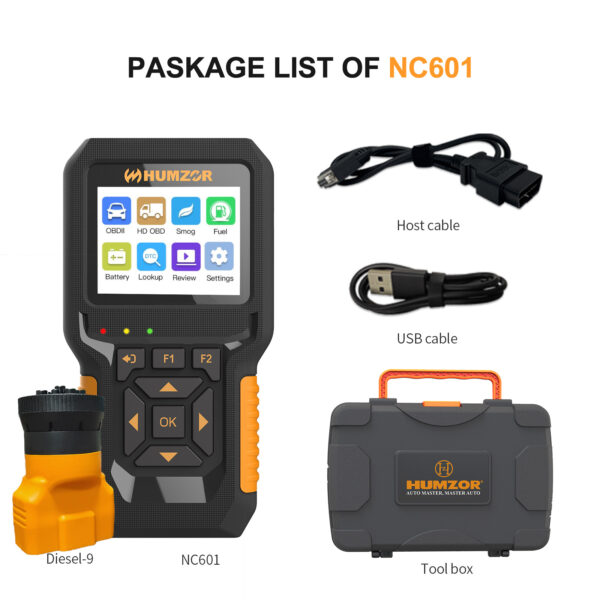
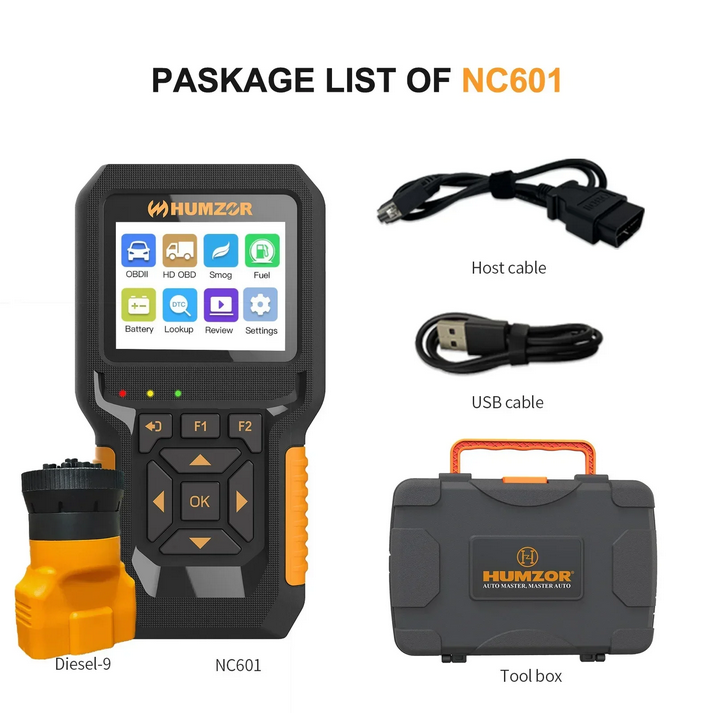
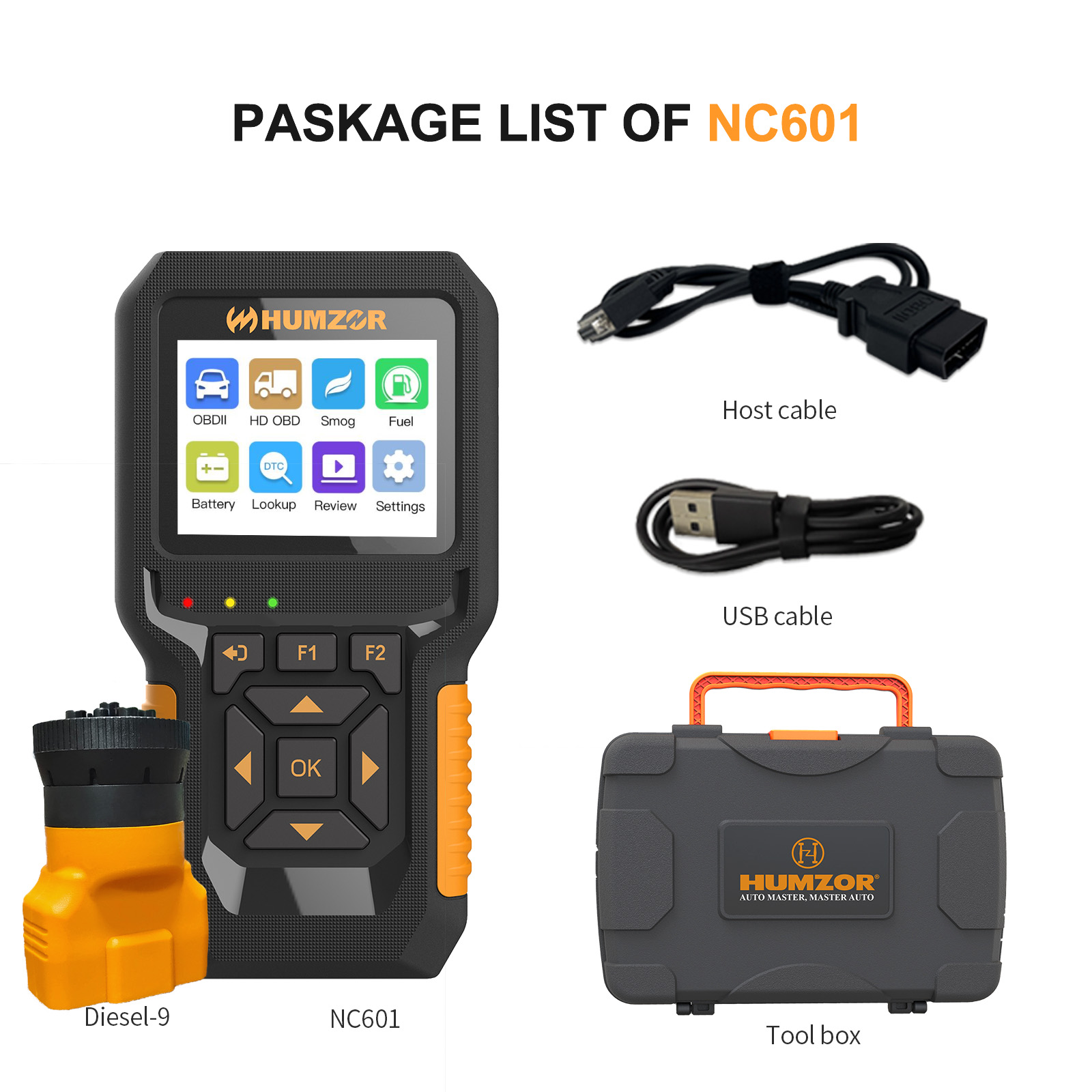
1 x HUMZOR NexzCheck NC601 Main Unit
1 x Diesel-9 Cable (9-pin adapter for J1939 protocol)
1 x USB Connector Cable
1 x Host Cable (OBD2 16-pin connector)
1 x Tool Box
HUMZOR NexzCheck NC601 User Manual
HUMZOR NC601 OBD2 Car Scanner Features
The NexzCheck NC601 offers a robust set of features for comprehensive vehicle diagnostics:
Wide Vehicle Compatibility: Supports 12V and 24V gasoline and diesel OBD2 Diagnosis protocols.
Extensive Fault Code Database: More than 50,000 fault code analyses for both car and heavy-duty vehicles.
Multi-System Support: Supports 92 systems in light-duty and heavy-duty vehicles (J1939 protocol).
One-Key Functions: Dedicated F1 and F2 buttons for quick access to key diagnostic functions.
Multi-Language Interface: Supports 7 languages including English, French, German, Spanish, Russian, Chinese, and Italian.
Complete OBD2 Functions: Offers a full suite of OBD2 diagnostic capabilities.
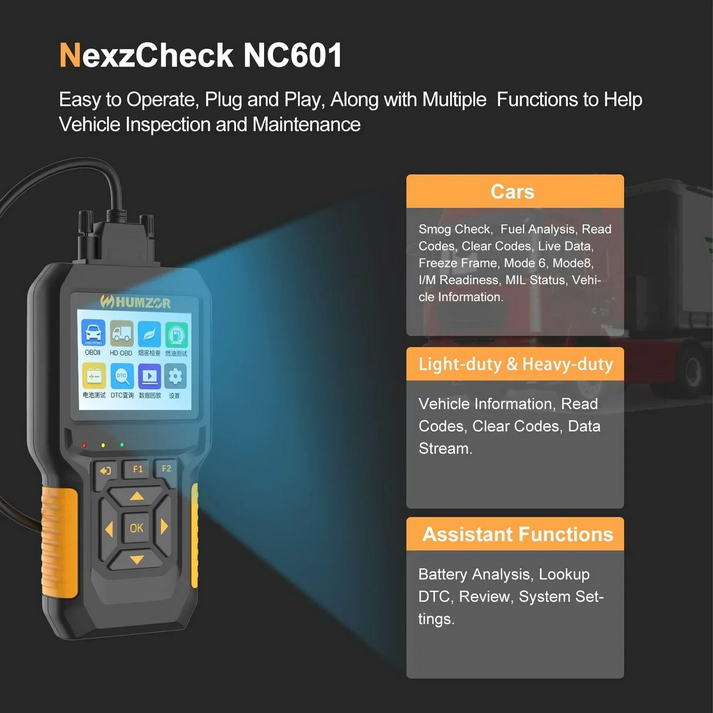
Advanced Analysis: Includes Smog Check, Fuel Analysis, and Battery Analysis functions.
What are the advantages of NC601 OBD car code reader?
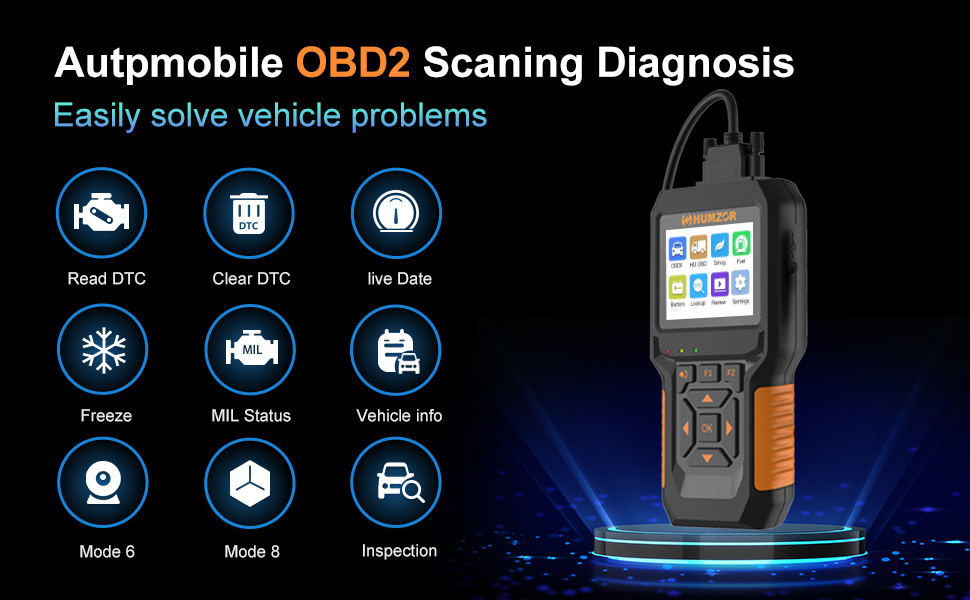
Read and Erase DTC: Quickly read and erase error codes, including Stored DTC – Gap DTC – Permanent DTC.
Real-time data: You can not only read real-time data, but also record data for later viewing and DIY multiple display modes (chart or line table).
Freeze Frame Data: Stored operating conditions when DTCs are stored.
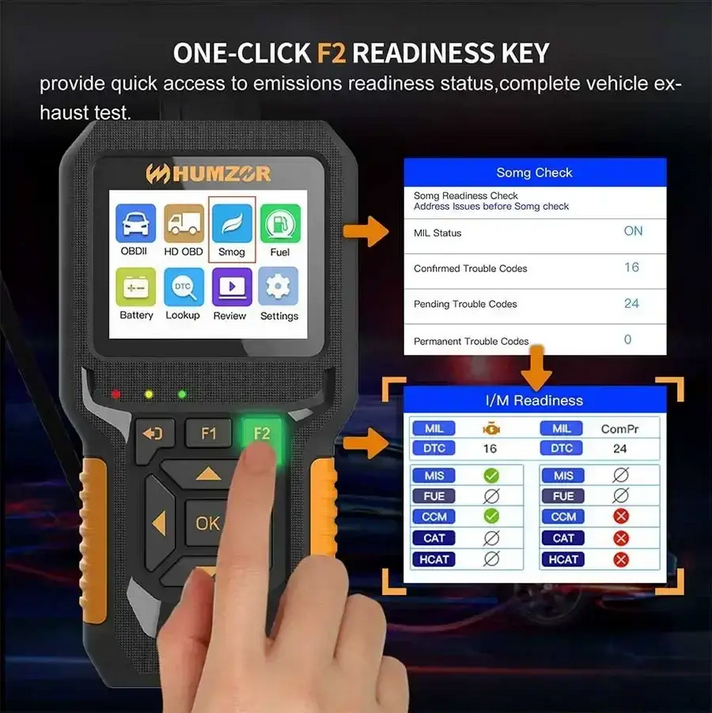
I/M Readiness Monitor: Indicator to determine if all emissions components have been evaluated by the OBD II system.
MIL Status: MIL Status allows checking of MIL status and run time/distance with the check engine light on, and run time/time since DTC cleared.
Vehicle Information: This function retrieves the Vehicle Identification Number (VIN), Calibration ID Number (CIN), Calibration Verification Number (CVN)
Mode 6: Retrieve and display test results for emissions-related powertrain components and systems
Mode 8: Allows to start the leak test of the vehicle’s EVAP system.
S-mog inspection: Check whether the vehicle exhaust meets the standards, and display various indications and status of the vehicle.
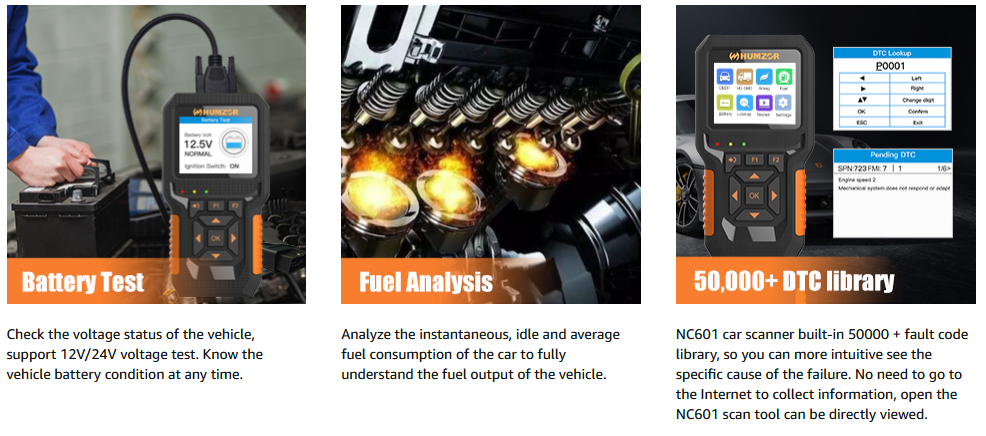
Fuel analysis: analyze the instantaneous, idle speed and average fuel consumption of the car.
Battery Test: Allows to view the status and voltage of the vehicle, when the vehicle fails to start. This feature will play a key role.
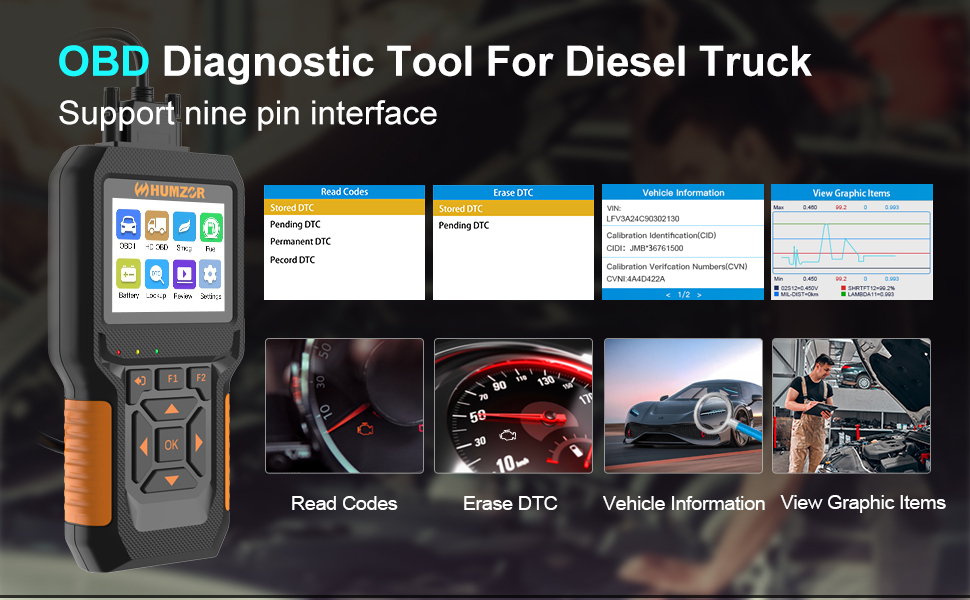
Heavy Duty Truck Scanner Diagnostic Features:
Code Read DTC: DTC are codes stored by the on-board computer diagnostic system in response to problems found in the vehicle. These codes identify specific problem areas and are designed to give you information on where a problem may be occurring within the vehicle.
Clear fault codes: After repairing according to the prompts of the scanner, clear the fault codes.
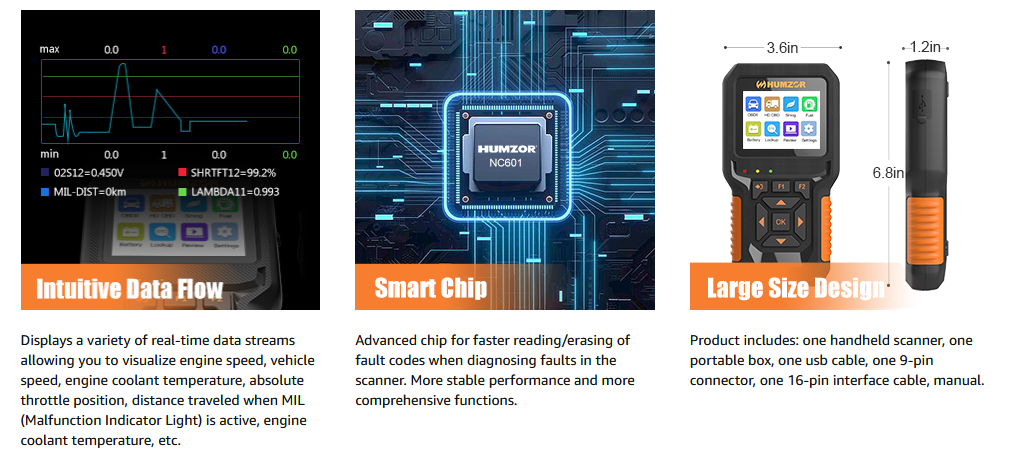
Data flow: Real-time display of engine load, vehicle speed, engine speed, intake air temperature, etc. (more than 100 key data flow information display system parameters of each module of the vehicle)
Vehicle Information: The vehicle information function can retrieve the Vehicle Identification Number (VIN), Calibration ID Number (CIN), Calibration Verification Number (CVN).
Data playback: store all data flow information, when the vehicle breaks down, there is no need to drive to the repair shop.
Suitable for Cummins, Caterpillar, Detroit, Paccar and other diesel engines – Note: The vehicle obd interface is a 9-pin interface for heavy duty trucks, which can be accessed from the OBD2 interface function when it appears to be unable to scan from the HDOBD function interface.
Functions that support heavy duty truck diagnostics: read fault codes, clear fault codes, vehicle information scan, voltage detection, real-time data stream, data playback function.
special attention: unsupported Freightliner、International、Kenworth,Cascadia、Mecedes Benz VAN、Volvo vnl,tractors、sami truck and not applicable to all trucks configured with 6PIN connector.
At present, it does not support special functions such as ABS, SRS, Oil reset, TPMS, etc.
Due to model year reasons, Hino and International trucks are not supported at this time.
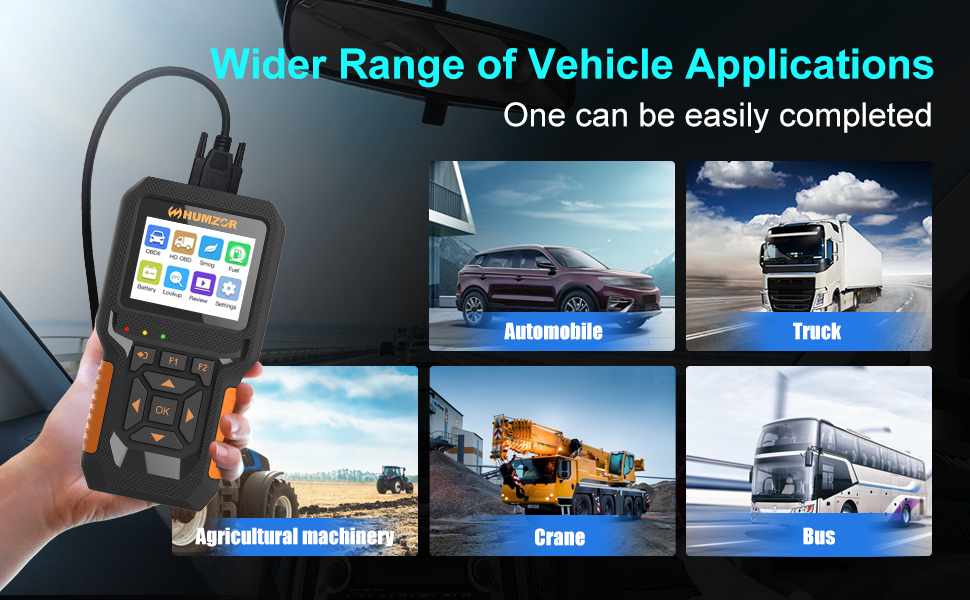
Extensive vehicle coverage.
Support all updated models (cars, pickups (diesel), light trucks) sold in the United States after 1996, Europe and Asia in 2000, and these models need to be fully compatible with the OBDII protocol.
Support all newer models (diesel trucks, heavy trucks, utility vehicles, agricultural vehicles, etc.) sold in the United States, Europe and Asia after 1996. Note: These models need to be fully compatible with the J1939 protocol.
Support 9 languages – English, Chinese, French, Spanish, German, Russian, Italian, Polish, Japanese. It provides accurate and fast diagnosis to car owners all over the world.
HUMZOR NexzCheck NC601 Setup Guide
The NexzCheck NC601 is designed for easy plug-and-play operation. Follow these steps to set up your device:
Locate the OBD-II Port: In most vehicles, the OBD-II port is located under the dashboard on the driver’s side. For heavy-duty vehicles, the J1939 port may be located elsewhere (refer to your vehicle’s manual).
Connect the Host Cable: Plug the 16-pin OBD2 host cable into the vehicle’s OBD-II port. Ensure a secure connection.
Connect Diesel-9 Adapter (if applicable): If diagnosing a heavy-duty vehicle using the J1939 protocol, connect the Diesel-9 adapter to the vehicle’s 9-pin diagnostic port, then connect the host cable to the adapter.
Power On: The NC601 device will automatically power on once connected to the vehicle’s diagnostic port. The screen will illuminate, indicating it is ready for use.
Language Selection: Upon first use, you may be prompted to select your preferred language. Navigate using the arrow keys and confirm with the ‘OK’ button.
HUMZOR NexzCheck NC601 Operating Instructions
The NC601 provides various diagnostic and analysis functions. Use the navigation buttons (Up, Down, Left, Right) and ‘OK’ to select options, and ‘ESC’ to go back.
HUMZOR NexzCheck NC601 Car and Truck OBD2 Scan Tool Diagnostic Tool Basic Diagnostic Functions
These functions are accessible from the main menu:
Read Codes: Retrieves Diagnostic Trouble Codes (DTCs) from the vehicle’s ECU.
Clear Codes: Erases DTCs from the vehicle’s ECU. Use only after addressing the underlying issue.
Live Data: Displays real-time data stream from the vehicle’s sensors and components.
Freeze Frame: Captures a snapshot of vehicle operating conditions at the moment a fault code was set.
Mode 6: Accesses results of on-board diagnostic monitoring tests for specific components/systems.
Mode 8: Initiates control of the on-board system, test or component.
Vehicle Information: Displays vehicle identification number (VIN), calibration ID (CID), and calibration verification number (CVN).
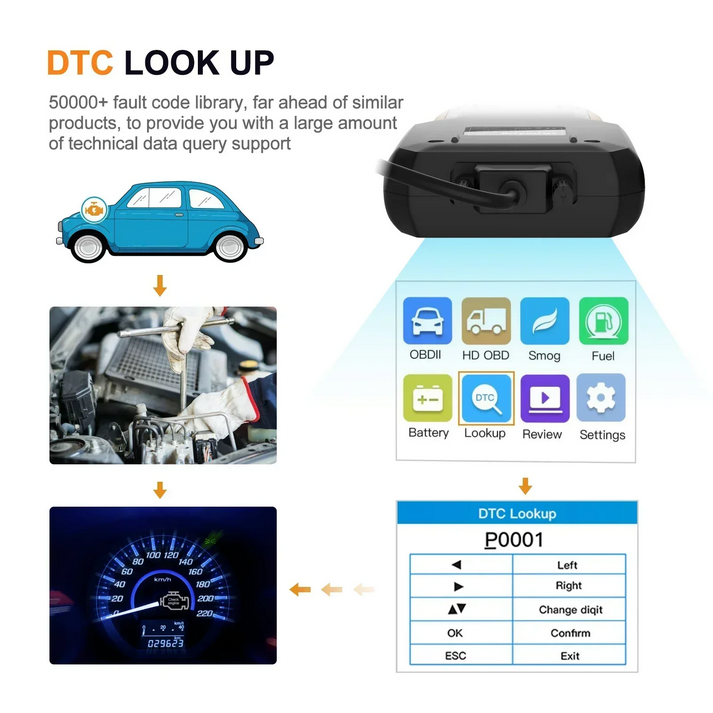
DTC Lookup
The device features an extensive fault code library. To look up a DTC:
From the main menu, select ‘Lookup’.
Enter the DTC code using the navigation buttons to select characters and ‘OK’ to confirm.
The device will display a description of the fault code.
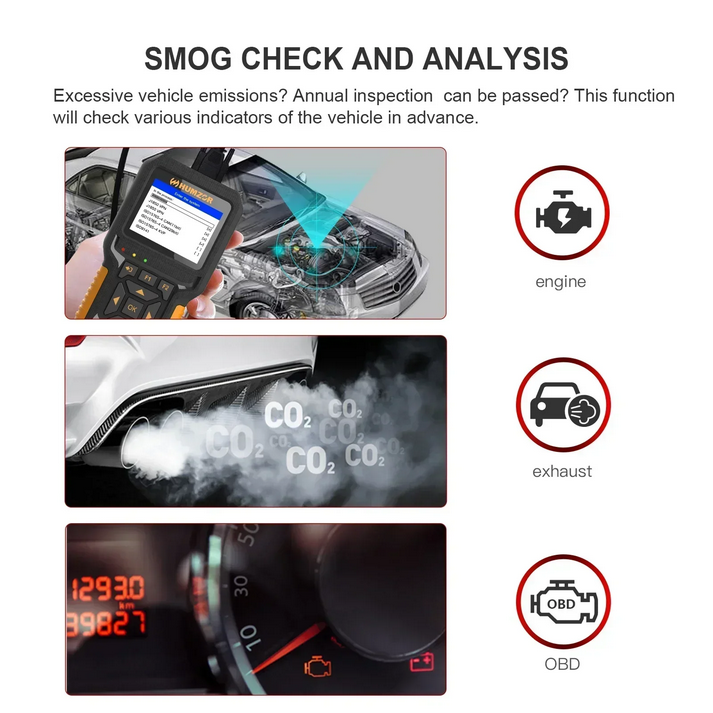
Smog Check (I/M Readiness)
This function checks if the vehicle’s emission-related systems are operating correctly and are ready for an emissions test.
From the main menu, select ‘Smog’.
Alternatively, press the F2 button for one-click access to I/M Readiness status.
The device will display the status of various monitors (e.g., MIL status, confirmed trouble codes, pending trouble codes).
Fuel Analysis
This function helps analyze the relationship between instant fuel consumption, engine speed, and load.
From the main menu, select ‘Fuel’.
The device will display real-time fuel consumption data and related engine parameters.
5.5. Battery Test
The NC601 can display the vehicle’s battery voltage and provide a basic assessment of its status.
From the main menu, select ‘Battery’.
The device will show the current battery voltage and a comment on its health.
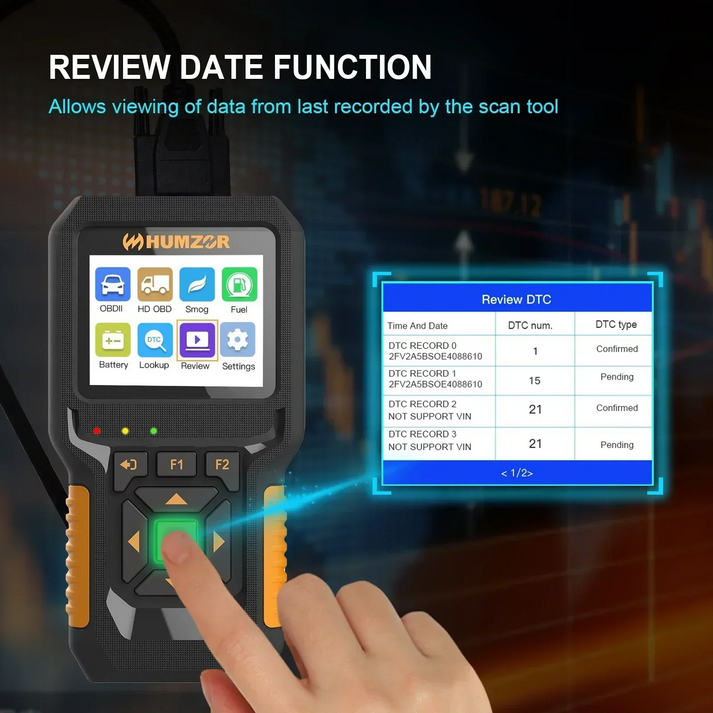
5.6. Review Data
This function allows you to view previously recorded diagnostic data.
From the main menu, select ‘Review’.
Navigate through the recorded DTC records, which include time, date, DTC number, and type.
5.7. Datastream Comparison
The device allows for graphical comparison of multiple live data streams.
While viewing Live Data, select the option to ‘View Graphic Items’.
Choose 2-4 datastreams to compare simultaneously.
The device will display a graphical representation of the selected data, highlighting differences.
Troubleshooting
If you encounter issues while using the NexzCheck NC601, refer to the following common problems and solutions:
Device does not power on: Ensure the diagnostic cable is securely connected to the vehicle’s OBD-II/J1939 port. Check the vehicle’s battery for sufficient charge.
Communication error: Verify that the vehicle’s ignition is in the ‘ON’ position (engine off or running, depending on the test). Ensure the cable connections are firm. Try connecting to a different vehicle to rule out a vehicle-specific issue.
No data displayed: Confirm the vehicle supports the specific OBD2 mode or system you are trying to access. Some older vehicles or specific modules may not support all functions.
Incorrect language displayed: Navigate to ‘Settings’ from the main menu and select your preferred language.
Screen frozen: Disconnect the device from the vehicle, wait a few seconds, and then reconnect it.
HUMZOR NexzCheck NC601 Specifications
| Attribute | Value |
|---|---|
| Model Name | HUMZOR NexzCheck NC601 |
| Brand Name | YBQCPJ (HUMZOR) |
| Supported Vehicles | 12V and 24V Gasoline and Diesel OBD2 protocols |
| Supported Systems | 92 systems (Light-duty & Heavy-duty) |
| Hardware Version | Newest |
| Software Version | Newest |
| Software Update | No |
| External Testing Certification | CE |
| Material | Plastic |
| Item Weight | 1kg |
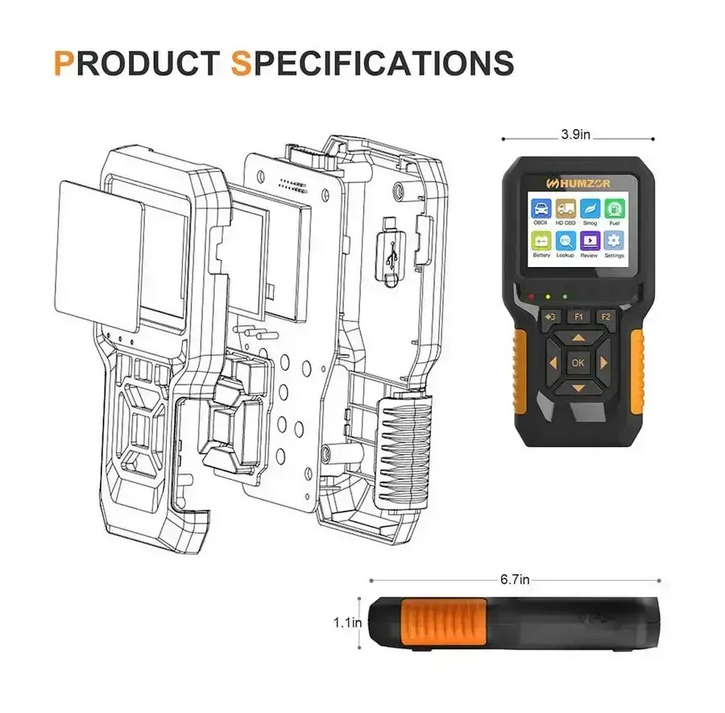
| Item Dimensions (L x W x H) | 6.7in x 3.9in x 1.1in (approx. 20cm x 20cm x 2cm) |
| Languages Supported | English, French, German, Italian, Polish, Russian, Spanish |
| Batteries Included | No |
Maintenance
To ensure the longevity and optimal performance of your HUMZOR NexzCheck NC601, follow these maintenance guidelines:
Cleaning: Use a soft, dry cloth to clean the device. Do not use abrasive cleaners or solvents.
Storage: Store the device in its original tool box in a cool, dry place away from direct sunlight and extreme temperatures.
Cable Care: Avoid bending or twisting the diagnostic cables excessively. Always grasp the connector when plugging or unplugging, not the cable itself.
Avoid Liquids: Keep the device away from water and other liquids to prevent damage to internal electronics.
9. User Tips
While no specific user reviews or Q&A were provided, here are some general tips for using diagnostic tools:
Always ensure the vehicle’s ignition is in the ‘ON’ position before connecting the scanner to establish communication.
For accurate readings, perform diagnostic tests when the engine is at operating temperature, if possible.
When clearing codes, remember that this only turns off the check engine light; it does not fix the underlying problem. Always diagnose and repair the fault before clearing codes.
Familiarize yourself with your vehicle’s specific diagnostic port location and any special connection requirements, especially for heavy-duty vehicles.
10. Warranty and Support
For warranty information, technical support, or service inquiries, please refer to the documentation provided with your purchase or contact the seller directly. Keep your purchase receipt as proof of purchase for any warranty claims.
CheShiTech.com— China OBD2 Tool, Automotive Diagnostic Tools, Car Key Programmer, OBD2 ECU chip tuning tool Center.
Contact information:
Website: https://www.cheshitech.com
Email: chinaobd2store@gmail.com
Skype: sales-obd2store@outlook.com
Whatapp/Wechat: +86-19870637508/+86-13691674080
https://api.whatsapp.com/send?phone=8619870637508
https://api.whatsapp.com/send?phone=8613691674080
其他信息
| 重量 | 0.8 磅 |
|---|
评价
目前还没有评价