

- 描述
- 其他信息
- 用户评价 (0)
描述
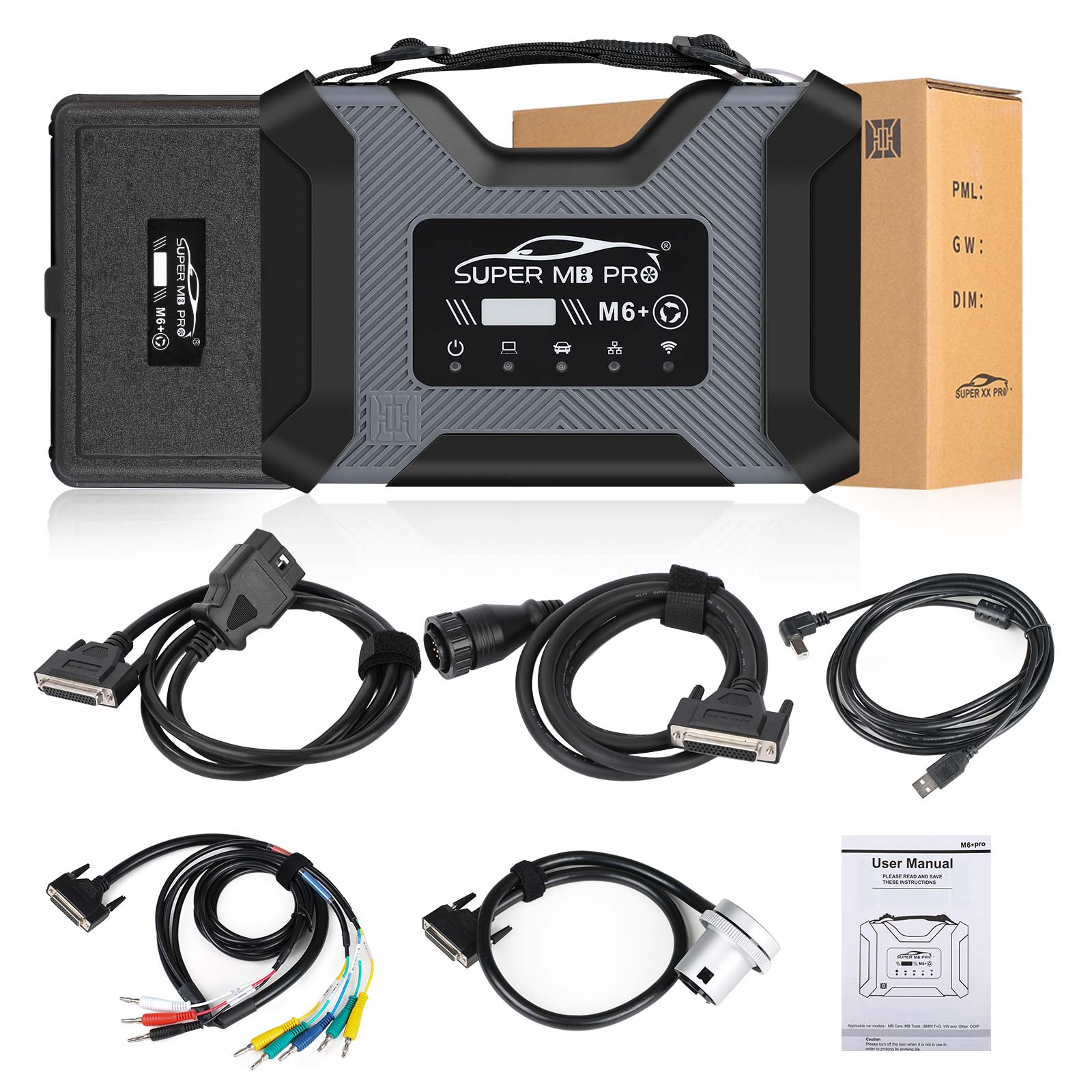
Super MB Pro M6+ Wireless Star Diagnosis Tool is MB Star Full Functions+ Benz Doip+ BMW F/G series Coding+ Other DoIP. Super MB Pro M6+ Full Configuration DoIP Benz Xentry Diagnostic Scanner With 5 Cables Compatible with Original Mercedes Benz Software. CheShiTech.com Super MB Pro M6+ MB Star Xentry Diagnostic Tool Doip MB Pro M6+ Plus Full Version Support BMW Aicoder and E-SYS.
Super MB Pro M6+ Wireless Star Diagnosis Tool Super MB Pro M6+ Full Configuration DoIP Benz Xentry Diagnostic Scanner With 5 Cables Compatible with Original Mercedes Benz Software
CheShiTech.com Super MB Pro M6+ MB Star Xentry Diagnostic Tool Doip MB Pro M6+ Plus Full Version Support BMW Aicoder and E-SYS
Super MB Pro M6+ Wireless Star Diagnosis Tool Description:
Super MB Pro M6+ Full Configuration= MB Star Full Functions+ Benz Doip+ BMW F/G series Coding+ Other DoIP
Compatible with the original Mercedes-Benz software.
M6+ supports BMW E-SYS, Aicoder, BMW APP software
Support new models such as W223 c206 213 167
Super MB Pro M6+ Full Configuration= MB Star Full Functions+ Benz Doip+ BMW F/G series Coding+ Other DoIP.
Based on M6, Super MB PRO M6+ has greatly improved product functions and compatibility, and is 100% compatible with the original Mercedes-Benz software.
Super MB Pro M6+ Wireless Star Diagnosis Tool Features:
1. 100% compatible with the original Mercedes-Benz software.
2. The front label of the M6+ uses a design with trademark rights and art copyrights to improve product recognition.
3. The communication interface between the M6+ and the computer is a USB3.0 interface, which improves the compatibility of the product with computers and tablets. (Compatible with both old and new computers and tablets, no need to choose old-fashioned computers and tablets with network ports.)
4. M6+ supports remote C-side operation. The client does not need to install special diagnostic testing software. Just connect the M6+ to a local computer that can access the Internet, and we can remotely provide customers with paid diagnosis and detection services of vehicle failure. Customers can also set up a local remote diagnostic test in the local area network. The above ways greatly improve the product flexibility.
5. M6+ supports BMW E-SYS, Aicoder, wired and wireless programming and coding of F and G series, and supports BMW modification, hidden functions activation.
6. M6+ supports BMW APP software, provides mobile phone English version of Bimmercode (coding hidden functions activation) Bimmerlink (diagnostics codes clearing) and other mobile phone software, supports MHD .Bimmergeeks .. XHP Flashtool. ODIS-e.XDelete.THOR-the M Flasher.PRO- Tool and other mobile apps.
7. M6+ supports vehicles with DOIP communication protocol, such as the new Volkswagen, Audi, Skoda, Bentley, Lambo, etc. A dedicated transition button is provided.
8. Support new models such as W223 c206 213 167
Super MB Pro M6+ Support Car List:
Passenger Car Supported List:
A(176), A(169), A(168), B(246), B(245), CLC(117), C(204) C(203), C(202), 190(201), E(212), E(211), E(210), 124(124), S(222), S(221), S(220), S(140), S(126), E(207), CLK(209), CLK(208), CLS(218), CLS(219), CL(216), CL(215), CL(140) SLK(172),
SLK(171), SLK(170), SL(231), SL(230), SL(129), SL(107), SLS(197), M(166), M(164), M(163), G(463), G(461), E(212), E(211), E(210), 124(124), S(222), S(221),S(220), S(140), CLK(209), CLK(208), CLS(218), CLS(219), CL(216), CL(215), CL(140), SLK(172), SL(231), SL(230), SL(129), SL(107),SLS(197), M(166), M(164), M(163), G(460), GL(164), GLK(204), R(251)
Van Supported List:
MB 100(631), T1, SprinterIII, SprinterII, SprinterI, Sprinter900, Citan, Vito(639), Vito(638), V(638), Viano(639), T2, Vario, Vaneo(414)
Truck Supported List:
Actros963/4, Actros2,3, AtegoIII, AtegoII, AxorII, Eonic, Zetros, Actros, Atego Light, Atego Heavey, HPN M96, Atron, HPN M2000, SKL, FSK, Further model series
Unimog Supported List:
U20, UGN, UHN
Bus Supported List:
TRAVEGO, INTOURO, INTEGRO, CITARO, CAPACITY, CITO, TOURISMO, O350/O403, CONECTO, O404, O405-O408, Minibus, OC500, TOURO, TOURINO, MBC, MULITEGO, O500, O500/OH, OH, OH368, OF, OF384, LO, O400, FURTHER MODEL SERIES
Super Sports Car Supported List:
SLR(199)
Super MB Pro M6+ and M6 Comparison Table:
What’s New in Super MB Pro M6+?
1. Supports E-SYS, Aicoder for BMW F and G series coding
2. Compatible with APP like, BMW BimmerCode, Bimmerlink, MHD, Bimmergeeks, XHP Flashtool, ODIS-e, XDelete, M Flasher, etc
3. Can be used as a DoIP device for VAG
| M6 Product Functions | M6+ Product Functions | |
| XENTRY | √ | √ |
| XENTRY Truck | √ | √ |
| DTS | √ | √ |
| VIDEO | √ | √ |
| MB DOIP | √ | √ |
| MB WIFI | √ | √ |
| PC USB | × | √ |
| PC RJ45 | √ | × |
| BMW Aicoder | × | √ |
| BMW E-SYS | × | √ |
| BMW APP | × | √ |
| Other DOIP | × | √ |
Super MB Pro M6+ Connection Instructions:
1. Connection between MB diagnostic software and hardware
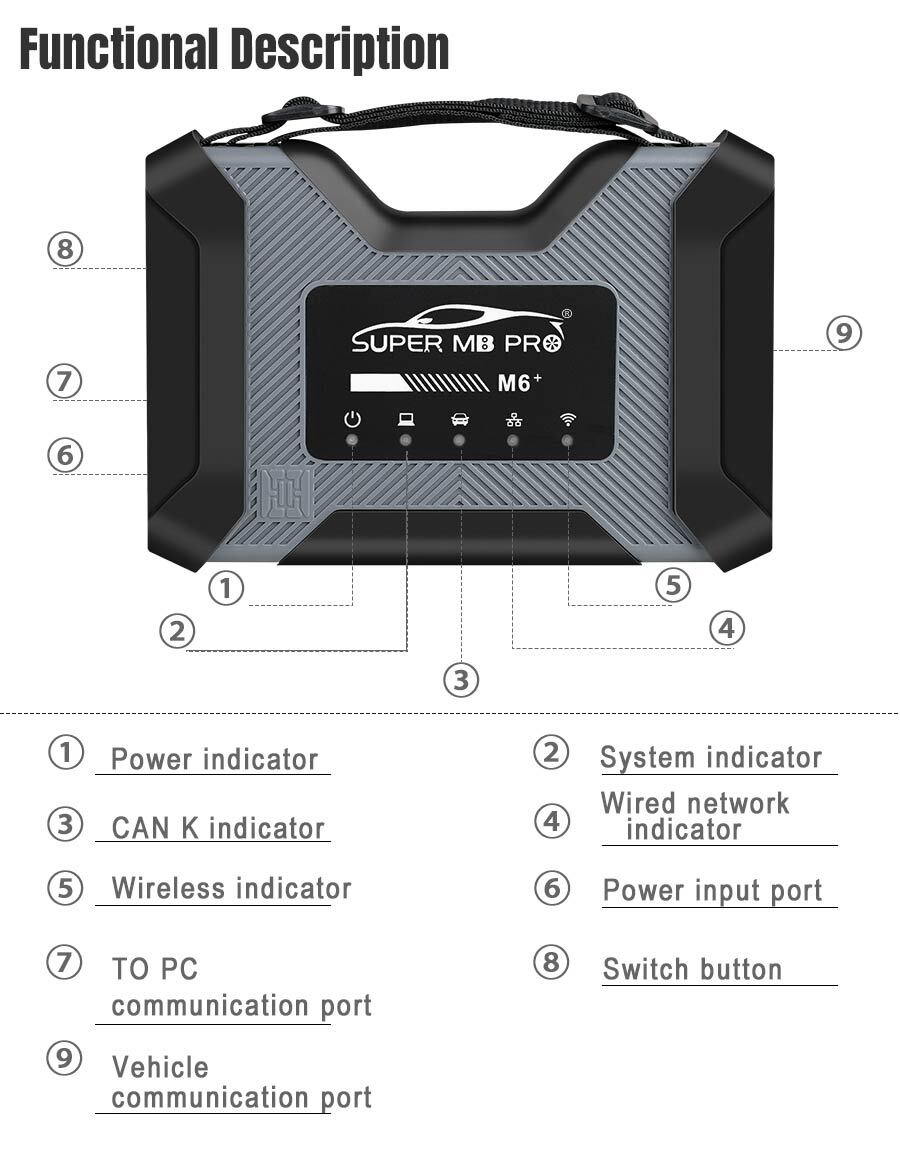
(1)Connect the M6+ hardware box to the car diagnostic interface via the test line. The red indicator light ① on the host is always on, and the system indicator ② is flashing during startup. After startup, ② is always on and beeps once, indicating the startup is finished.
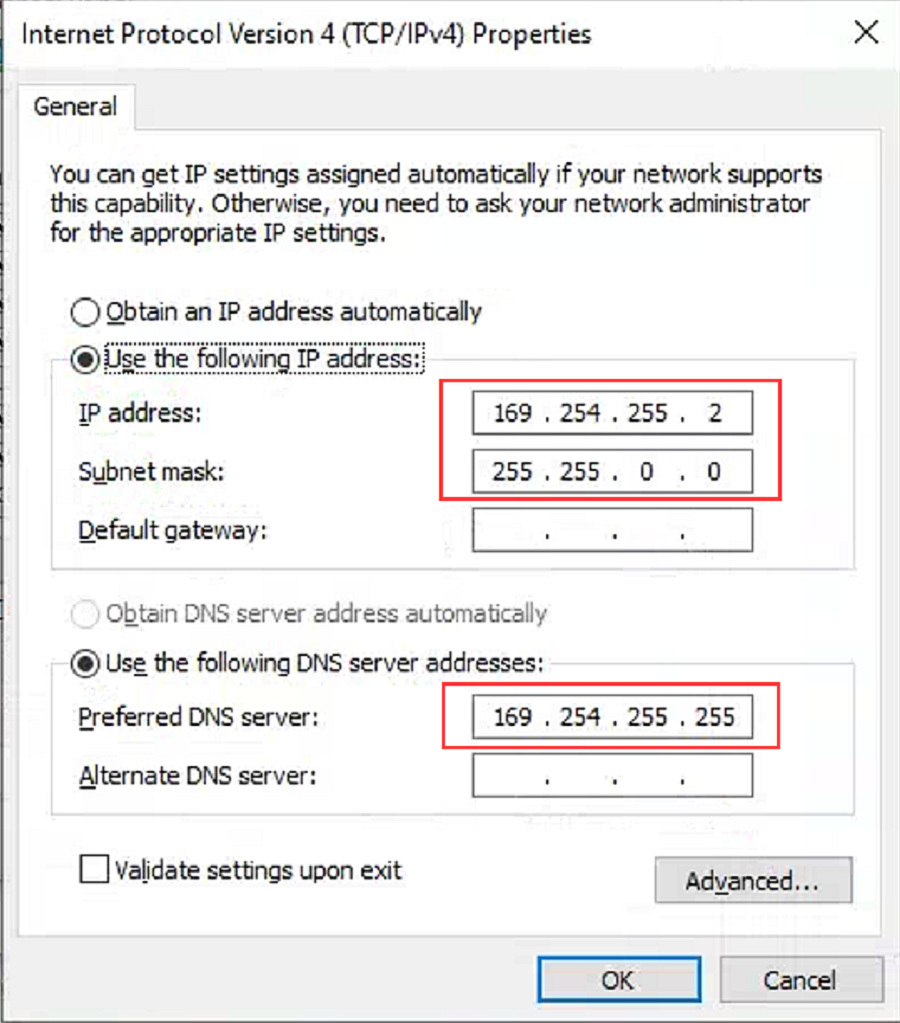
(2)Wired connection: Connect the USB port ⑦ of the M6+ hardware box to the USB port of the computer or tablet via a USB cable, and a new network connection will appear on the network management interface of the computer or tablet (WIN10 driver-free), and the IP address of the network connection property will be changed to 169.254.255.*, Subnet mask: 255.255.0.0, Preferred DNS: 169.254.255.255, click “Advanced”, add multiple IP addresses as 172.29.127.*, 255.255.0.0. After the computer or tablet is connected to the network, ④ the indicator light will be on.
(3) Wireless connection: You cannot find the wireless network by plugging in the USB cable. Unplug the USB cable from the M6+ hardware box port, and you will find a M6+ DOIP-**** network on the computer or tablet, just connect it. ⑤ The green light of the wireless indicator is always on, the wired light is off, no setting is required, the password is 123456789.
(4) After opening the BEN software lock on the computer side, the original diagnostic test software can be used normally.
(5) For remote C-end operation, please consult us.
2, BWM software and hardware connection
(1)Connect the M6+ hardware box to the car diagnostic interface via the test line. The red indicator light ① on the host is always on, and the system indicator ② is flashing during startup. After startup, it is always on and beeps once, indicating the startup is finished.
(2)Wired connection: Connect the USB port of the M6+ hardware box to the USB port of the computer or tablet via a USB cable, and a new network connection will appear on the network management interface of the computer or tablet (WIN10 driver-free), and change the network connection attribute IP address to 172.29.127.* 255.255.255.0. Click “Advanced” and add a multi-IP address as 169.254.0.* 255.255.255.0. After the computer or tablet is connected to the network, the indicator light ④ will be always on. Press and hold the switch button ⑥ on the side for 3 seconds and then release it. You can see that the ④ green indicator light is always on and then flashing, indicating that the test can be performed normally. It will return to the initial state after it is powered on again.
(3)The wireless network can NOT be found by plugging in the USB cable. Unplug the USB cable from the M6+ hardware box port, and you will find a M6+ DOIP-**** network on the computer or tablet. You can connect without any settings, and the password is 123456789, ⑤The wireless indicator green light is always on, ④The wired indicator is off. Press and hold the ⑥ switch button on the side for 3 seconds and release it, you can see ⑤the wireless green indicator light is always on and turns to flashing, indicating that the test can be performed normally. It will return to the initial state after it is powered on again.
(4) The computer-side BWM software adopts wired or wireless connection, and the mobile phone BWM APP software adopts wireless connection.
(5) For remote C-end operation, please consult us.
3. For DOIP function and hardware connection of other diagnostic test software, please refer to BWM software and hardware connection method
Super MB Pro M6+ Display:
Super MB M6+ PRO Mercedes-Benz and BMW configuration
1. Plug the M6+PRO into the power supply or connect the OBD to the test vehicle, and plug in the USB/LAN cable of the M6+PRO.
2. Turn on the computer and plug in the computer USB/LAN cable.
3. Open the computer network configuration interface and find the Realtek USB FE Family Controller network/the network adapter that comes with the PC.

4. Click “Properties”–TCP/IPV4, and set the IP address as shown in the figure below.
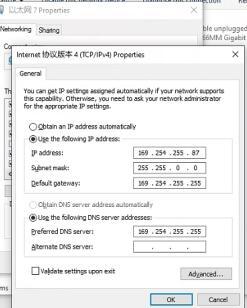
5. Click “Advanced”, and add a group of network IP addresses as shown in the figure below.
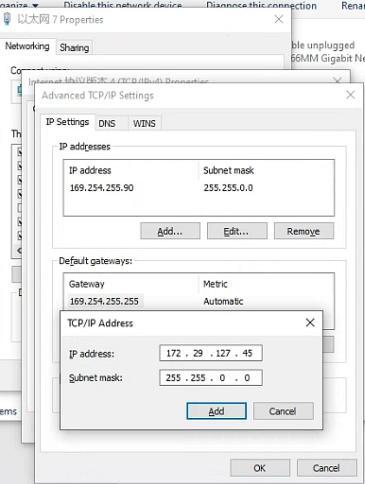
6. Click “OK”. After the configuration is successful, the display is as follows.
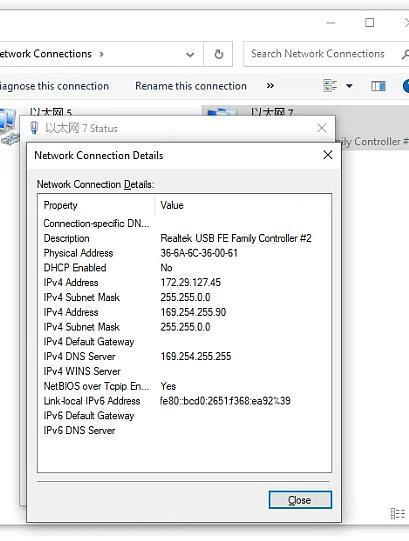
7.For the same computer, if you replace a new M6+PRO, you need to reset the IP address. After the setting is completed, the computer is successfully bound to the M6+PRO and there is no need to set the IP address again for wired and wireless Internet access. (Use LAN port connection mode, no need to re-set IP when changing devices).
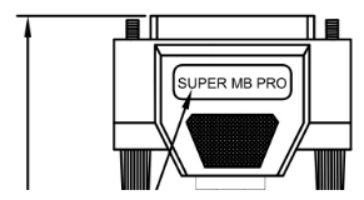
8.You can test Mercedes-Benz normally. Please connect the diagnostic cable with SUPER MB PRO logo.
9. BMW wireless BMWAiCode configuration(only for F+G chassis)
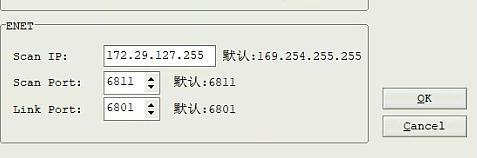
Connect to the M6+PRO -***, password:123456789, wirelessly, press and hold the M6+PRO switch button for 3 seconds, and the M6+PRO host wireless indicator will flash. The computer-side BMWAiCoder configuration is as follows:
10. BMW wired BMWAiCode configuration(only for F+G chassis)
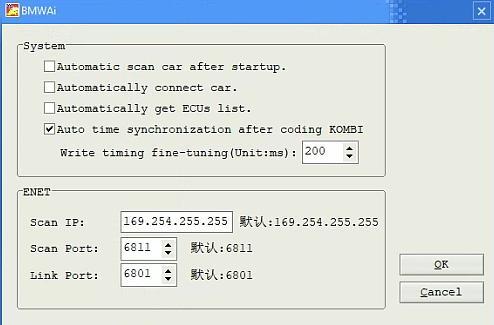
Connect the USB/LAN cable, press and hold the M6+PRO switch button for 3S, and the M6+PRO host wired indicator light will flash. The computer-side BMWAiCoder configuration is as follows:
11. BMW wired and wireless E-Sys configuration(only for F+G chassis)
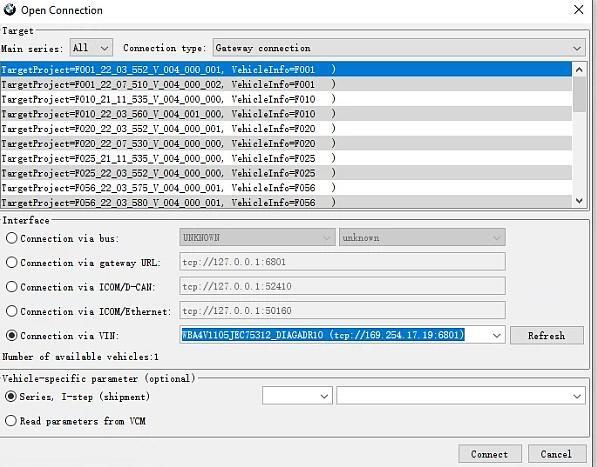
Connect to the M6+PRO -*** wirelessly, press and hold the M6+PRO switch button for 3 seconds, and the M6+PRO host wireless indicator will flash. On the computer side, select the following for direct connection. Wired is similar, no setup required.
12. BMW wired ISTA configuration(only for F+G chassis)
Connect the USB cable, press and hold the M6+PRO switch button for 3S, and the M6+PRO host wired indicator light will flash. The computer ISTA configuration is as follows:
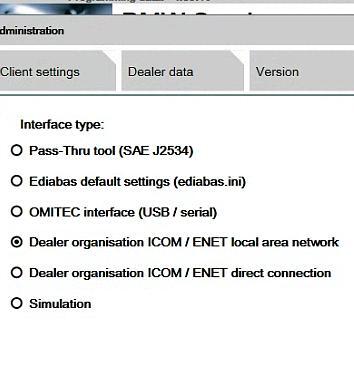
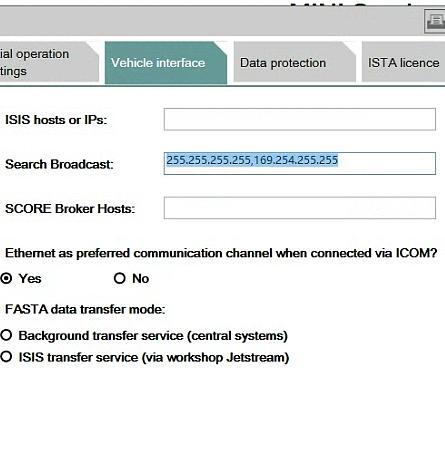
13. BMW Wireless ISTA configuration(only for F+G chassis)
Connect to the M6+PRO -*** wirelessly, press and hold the M6+PRO switch button for 3 seconds, and the M6+PRO host wireless indicator will flash. The computer side is selected as follows:
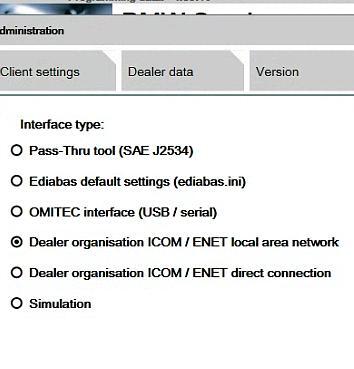
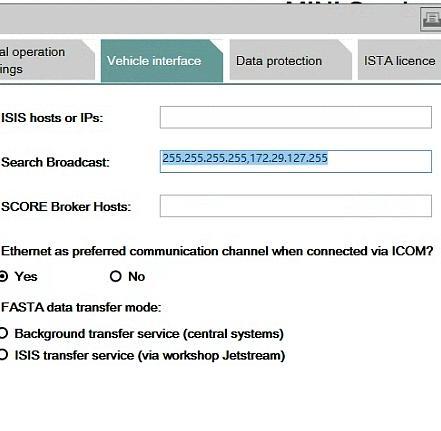
14.The mobile phone BWM APP adopts wireless connection. (only for F+G chassis)
Connect to the M6+PRO -***, password: 123456789, press and hold the M6+PRO switch button for 3 seconds, and the M6+PRO host wireless indicator will flash.
15. Supported BMW models and years.
| Model Year | 2019 | 2018 | 2017 | 2016 | 2015 | 2014 | 2013 | 2012 | 2011 | 2010 | 2009 |
| X1 | √ | √ | √ | √ | |||||||
| X3 | √ | √ | √ | √ | √ | √ | √ | × | |||
| X4 | √ | √ | √ | √ | √ | √ | |||||
| X5 | √ | √ | √ | √ | √ | √ | × | ||||
| X6 | √ | √ | √ | √ | √ | × | |||||
| 1 Series | √ | √ | √ | √ | √ | √ | √ | √ | × | ||
| 2 Series | √ | √ | √ | √ | √ | √ | √ | √ | |||
| 3 Series | √ | √ | √ | √ | √ | √ | √ | × | |||
| 4 Series | √ | √ | √ | √ | √ | √ | √ | ||||
| 5 Series | √ | √ | √ | √ | √ | √ | √ | √ | √ | √ | × |
| 6 Series | √ | √ | √ | √ | √ | √ | √ | √ | × | ||
| 7 Series | √ | √ | √ | √ | √ | √ | √ | √ | √ | √ | √ |
Super MB Pro M6+ Full Configuration Package Includes:
1pc x SUPER MB PRO M6+ Host
1pc x OBD2 16pin Cable
1pc x USB Cable
1pc x 38PIN Cable
1pc x 14PIN Cable
1pc x 4PIN Cable
CheShiTech.com— China OBD2 Tool, Automotive Diagnostic Tools, Car Key Programmer, OBD2 ECU chip tuning tool Center.
Contact information:
Website: https://www.cheshitech.com
Email: chinaobd2store@gmail.com
Skype: sales-obd2store@outlook.com
Whatapp/Wechat: +86-19870637508/+86-13691674080
https://api.whatsapp.com/send?phone=8619870637508
https://api.whatsapp.com/send?phone=8613691674080
其他信息
| 重量 | 3.6 公斤 |
|---|
成为第一个“Super MB Pro M6+ Wireless Star Diagnosis Tool Super MB Pro M6+ Full Configuration DoIP Benz Xentry Diagnostic Scanner With 5 Cables Compatible with Original Mercedes Benz Software” 的评价者
Related Products
Super MB Star C3 Mercedes Diagnostic System MB Star Diagnosis C3 Multiplexer Supports 1989~up to now Car, Bus, Truck, Sprint, Smart
原价为:$259.99。$219.99当前价格为:$219.99。

评价
目前还没有评价